Diagonal: A Modern Handwritten Script Font for Creative Projects
Finding the perfect typeface is often the turning point for a design. It can either elevate a message or muddle it completely. If you are a crafter, designer, or entrepreneur looking for a typeface that bridges the gap between professional elegance and personal warmth, Diagonal is a compelling option. Created by Kong Font Studio and available on Creative Fabrica, this modern and playful handwritten script font has been gaining traction for its versatility. However, like any specialized tool, using it effectively requires more than just a quick download. It requires an understanding of how script fonts behave in different environments.
Understanding the Appeal of Diagonal
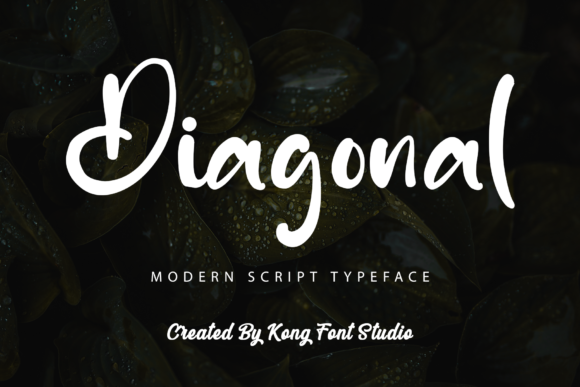
At its core, Diagonal is designed to mimic the fluidity of natural handwriting while maintaining a clean, modern aesthetic. Unlike traditional cursive fonts that can feel stuffy or overly formal, or grungy scripts that can be hard to read, this font strikes a balance. It feels personal and approachable, making it ideal for branding, social media graphics, and physical products like mugs or tote bags.
The "playful" aspect of the font suggests movement and energy. This makes it a strong candidate for designs targeting younger demographics or industries related to lifestyle, food, and wellness. However, the "modern" descriptor ensures that it does not look childish. It retains a sophistication that allows it to be used on wedding invitations, high-end packaging, and professional marketing materials when paired correctly.
Avoiding Common Pitfalls with Handwritten Fonts
Many users download a font like Diagonal with high hopes, only to be disappointed when the final design looks cluttered or amateurish. This usually stems from a few common misunderstandings about how script fonts function within a layout. To get the most out of this asset, you need to sidestep these errors.
The Legibility Trap
The most frequent mistake with modern script fonts is prioritizing style over readability. Because Diagonal features flowing connectors and stylistic swashes, it can become difficult to read if used at small sizes or over busy backgrounds.
- The Mistake: Using the font for long paragraphs of body text. A handwritten script is exhausting to read in large blocks. It is also a mistake to use it on a mobile screen at a size smaller than 24px, where the connecting strokes may blur together.
- The Better Approach: Reserve Diagonal for headlines, sub-headers, and call-to-action phrases. For body text, pair it with a clean, sans-serif font like Open Sans or Lato. This contrast allows the script to shine without overwhelming the reader.
The "One-Size-Fits-All" Color Error
Handwritten fonts carry a lot of visual texture. If you place a textured font on a textured background, the result is visual noise.
- The Mistake: Placing Diagonal over a complex patterned background or a photograph with high contrast (like a busy city street). The letters will get lost in the image details.
- The Better Approach: Create a clear focal point. Use a solid color background, or place the text inside a shape (like a circle or a solid banner) to separate it from the image. This ensures the playful nature of the font is an asset, not a distraction.
Technical Considerations: Spacing and Sizing
When you install Diagonal, you might notice that the default letter spacing (kerning) is tighter than standard serif fonts. This is intentional to maintain the flow of the handwriting. However, it can cause problems if you aren't paying attention.
Overlapping Characters
One of the overlooked details when using script fonts is how specific letter pairs interact. In a word like "Todays" or "Folly," the capital letter might crash into the lowercase letter that follows.
- The Issue: Ignoring these overlaps can make a design look sloppy. It suggests a lack of attention to detail, which can damage the credibility of a brand.
- The Fix: Most design software (like Adobe Illustrator, Canva, or Cricut Design Space) allows you to adjust kerning manually. Before finalizing a design, zoom in on your text. If letters are crashing, increase the tracking slightly or manually adjust the spacing between specific characters to ensure a smooth, readable flow.
Matching the Font to the Medium
Diagonal is marketed as looking stunning on posters and flyers, but the medium dictates the method. What works on a digital screen does not always translate to physical printing.
Digital vs. Print
On a website or social media post, Diagonal can be rendered with anti-aliasing that smooths out the edges, making it look crisp. However, when you send this design to a printer—especially for merchandise like t-shirts or tote bags—the rendering changes.
- The Warning: Thin, swashy strokes in handwritten fonts can sometimes "break" or disappear on fabric printing, especially if the ink bleeds slightly. If you are using a heat press or screen printing, extremely thin connections between letters might not hold up over time.
- The Solution: When designing for physical products, consider increasing the font weight if the font family allows it, or slightly enlarging the text. If you are using a Cricut or Silhouette machine to cut vinyl, ensure you "weld" the letters together. If you don't weld, the machine will cut around each individual letter, making it impossible to apply the vinyl decal as a single piece.
Checking Font Licensing and Features
Before you commit to Diagonal for a major client project or a product you intend to sell, you must verify the terms of use. Created by Kong Font Studio, this asset is widely available, but the license defines what you can legally do with it.
Commercial Use Rights
A common oversight is assuming that a font is free for commercial use just because it is available on a design platform.
- The Check: Always read the license agreement provided by the creator. Does it cover print-on-demand (POD) services? Can you use it on unlimited projects, or is it licensed per end-product?
- The Consequence: Using a font without the proper license for a product that generates revenue can lead to legal issues or takedown notices. It is safer to confirm the licensing status on the download page than to assume it is covered.
Exploring Alternates and Glyphs
Modern fonts often come with "extras" that beginners overlook. Diagonal likely includes alternate characters or stylistic sets—different versions of letters like 'a', 'g', or 's' that add variety to the text.
- The Missed Opportunity: Typing out a headline using the default characters can sometimes look repetitive. In handwriting, no two letters look exactly the same, but a font file repeats the same glyph unless told otherwise.
- The Pro Move: Open your software's Glyphs panel (in Illustrator or Photoshop) to see the alternate characters. Swapping out a few letters for their alternates can make the typography look more organic and authentic, elevating the quality of the design significantly.
Conclusion: Making the Right Choice
Choosing Diagonal is a smart move for anyone looking to inject personality and modern flair into their designs. It is a versatile tool that serves a wide range of creative needs, from digital marketing to physical crafting. However, the difference between a mediocre design and a stunning one lies in the execution.
By respecting the font's legibility limits, checking your spacing, verifying your license, and adapting your workflow for different mediums, you ensure that the font works for you, not against you. Treat Diagonal