Anguish: A Guide to Mastering the Vintage Blackletter Typeface
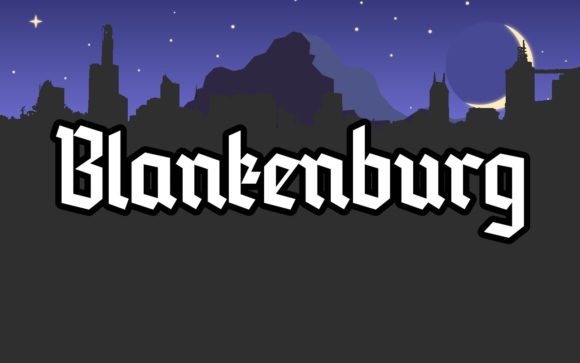
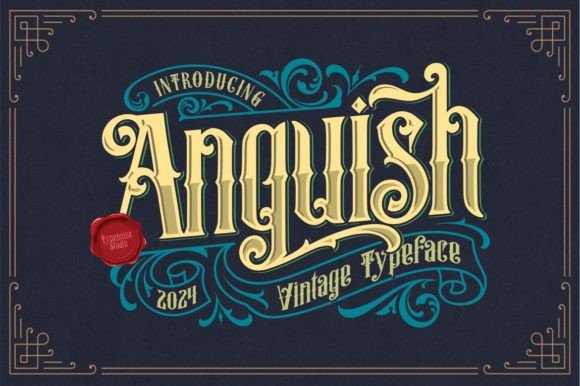
In the vast world of typography, finding a font that captures a specific era or emotion without feeling like a generic copy is a significant challenge. Anguish, a unique blackletter typeface, rises to this challenge by offering a strong, classic, and vintage vibe that feels both authentic and incredibly versatile. It’s not just another blackletter font; it’s a tool for creators who want to infuse their work with a sense of history, grit, and timeless elegance. From vintage logos and tattoo designs to striking posters and album covers, Anguish provides an original feel that can elevate a project from ordinary to unforgettable. However, working with a typeface this distinct requires a thoughtful approach to avoid common pitfalls that can undermine its powerful aesthetic.
Understanding the Core Identity of Anguish
Before you even type a single letter, it's crucial to understand what makes Anguish special. This isn't a font for long paragraphs of body text; its intricate, calligraphic strokes are designed for impact. Think of it as the headline act, not the supporting musician. Its blackletter roots give it a historical weight, while its vintage character adds a layer of authenticity that modern, clean fonts often lack. This combination makes it particularly effective for projects that need to convey tradition, craftsmanship, rebellion, or a raw, artistic edge. Misunderstanding this core identity is the first and most common mistake designers make, often leading to applications where the font feels out of place or is simply illegible.
Mistake: Sacrificing Legibility for Aesthetic
The most frequent error with a powerful display font like Anguish is prioritizing its look over its readability. A logo or poster is useless if your audience cannot decipher the message. This often happens when the font is used at too small a size, set against a low-contrast background, or used to spell out overly complex words. The result is a beautiful but ultimately frustrating piece of communication that fails its primary purpose.
The Better Approach: Always test your design for legibility. A good practice is to view your work from a distance or on a small mobile screen. Can you still read the key words? For logos, keep the text concise—often a single word or a short, impactful phrase works best. Pair Anguish with a simple, clean sans-serif or serif font for any secondary information. This creates a visual hierarchy that guides the viewer’s eye, ensuring the main message is both seen and understood. For instance, on an album cover, the band’s name in Anguish should be immediately clear, while the album title or tracklist might use a more neutral font.
Common Missteps in Application and Pairing
Beyond legibility, how you integrate Anguish into a larger design is critical. A powerful font can easily overwhelm a composition if not handled with care. Another frequent oversight is failing to consider the cultural and historical connotations of blackletter typography. While it can evoke medieval craftsmanship or vintage Americana, it can also be misinterpreted if used without context.
Mistake: Creating Visual Clutter or Tonal Dissonance
Pairing Anguish with another highly decorative or stylistic font is a recipe for disaster. Two competing "star" fonts will fight for attention, creating a chaotic and amateurish look. Similarly, using Anguish in a design that is otherwise minimalist and corporate can create a jarring tonal mismatch. The font’s vintage, textured feel will clash with sleek, modern elements, making the entire project feel confused about its own identity.
The Better Approach: Embrace contrast and hierarchy. The golden rule is: one statement font, one supporting font. Let Anguish be the hero. Pair it with a neutral, highly legible typeface like a clean sans-serif (e.g., Helvetica, Futura) or a classic serif (e.g., Garamond, Times New Roman). This allows the unique character of Anguish to shine without competition. Ensure the overall design aesthetic complements the font’s vibe. For a vintage flyer, use aged paper textures and muted color palettes. For a tattoo design, focus on strong lines and negative space. The goal is to create a cohesive visual story where every element supports the others.
Mistake: Ignoring the Details of the Glyphs
Many designers simply type and go, without exploring the full character set of a specialty font like Anguish. This often means missing out on alternate characters, ligatures, or stylistic sets that can add a custom, handcrafted feel to the work. These subtle variations are what separate a generic application from a truly unique one.
The Better Approach: Take the time to explore the font’s full potential. In your design software’s glyphs panel, look for alternate versions of letters, especially common ones like ‘A’, ‘S’, and ‘R’. Swapping these out can prevent awkward repetitions and give your wordmark a more organic, less mechanical appearance. Use ligatures (special characters that combine two or more letters) to create elegant connections. This attention to detail is what professionals use to make typography feel exclusive and intentional, ensuring your vintage logo or poster doesn’t look like it was made with a default setting.
Practical Advice for Sourcing and Using Anguish
Making a smart decision about where to get the font and how to use it in your workflow is just as important as the design itself. A poor choice here can lead to technical issues, legal problems, or a final product that doesn’t meet your quality standards.
Overlooking Licensing and File Quality
In the search for free resources, it’s easy to stumble upon fonts on dubious websites. Downloading Anguish from an untrusted source can lead to incomplete font files, corrupted glyphs, or—most critically—unclear licensing terms. Using a font without the proper license for your project (e.g., using a personal-use font for a commercial logo) can result in legal action and costly rebranding down the line.
The Better Approach: Always source your fonts from reputable foundries or marketplaces. Read the license agreement carefully before you buy or download. Does it cover your intended use? Is it a desktop license, a web license, or an app license? Investing in a properly licensed version of Anguish ensures you get high-quality, complete font files and the legal right to use your work professionally. It’s a small cost that protects your project and your reputation.
Is Anguish the Right Choice for Your Project?
Before committing, do a final evaluation. Ask yourself these questions:
- What is the core message? Does your project call for a sense of history, tradition, or bold artistry? Anguish excels here.
- Who is the audience? Will they appreciate and understand the vintage blackletter aesthetic?
- What is the medium? It’s fantastic for large-scale print and digital headers but ill-suited for small, detailed text.
- Can I pair it effectively? Do you have a plan for a clean, complementary font to ensure overall readability and balance?
If you can answer these confidently, then Anguish is likely a superb choice. By avoiding the common mistakes of misapplication, clutter, and poor sourcing, you can harness its unique power to create designs that are not only visually stunning but also effective and professional. It’s a typeface that demands respect and thoughtful use, but when wielded correctly, it can become the defining element that makes your work truly stand out.